JsonFlow
^v0.0.0Destaque BronzeOpen SourceCRA-readyFramework completo e avançado para JSON em Delphi/Object Pascal: serialização, desserialização, validação por schema e API fluente.
JsonFlow — High-performance JSON serialization, dynamic manipulation, and Draft-7 Schema validation for Delphi



🔒 Supply-chain transparency (CRA-ready): a machine-readable SBOM (CycloneDX) is published on the package portal — pubpascal.dev/packages/jsonflow · security disclosure policy in SECURITY.md.
📚 Documentation · ⬇️ Download · 🐛 Issues
English · Português (PT-BR)
JsonFlow is a state-of-the-art, high-performance, and feature-rich JSON manipulation, serialization, and JSON Schema validation framework for Delphi. It provides an enterprise-ready toolkit that integrates high-speed object serialization, in-place dynamic JSON editing, and robust Draft 7 JSON Schema validation under a unified, elegant, and fluent API. Every hot path — parsing, RTTI marshalling, path-based editing, and schema validation — has been profiled and optimized against public, reproducible benchmarks, delivering native speeds for intensive web applications, APIs, and microservices.
🚀 Key Features
- Advanced Serialization & Deserialization: Fluidly convert Delphi objects to JSON structures and vice-versa using custom attributes, mapping rules, and extensible pipelines.
- In-Place Dynamic Composer: Load and modify complex JSON structures in-place. Traverse nested elements fluidly using path strings (e.g.,
user.address[0].zip). - Draft 7 JSON Schema Validation: Fully validate JSON structures against Draft 7 specifications with detailed local error paths (
PathandSchemaPath). - Audited, Benchmark-Backed Performance (July 2026 hot-path audit, reproducible console harnesses):
- Serialization/Deserialization: up to 15× faster serialization and 7× faster deserialization than X-SuperObject (see charts below).
- Schema Validation: 3.4× faster after identity-based compile caching, precompiled regex rules, and O(1) incremental error paths.
- Path-based Editing: array inserts and path operations up to 33× faster via
IJSONArray.Insertand reusable navigation.
- Extensible Middleware System: Intercept, encrypt, decrypt, or format specific JSON fields (e.g., dates, currency, custom types) on the fly — with a compiler-enforced contract validated at registration.
🏛 Compatibility Matrix
| Environment / IDE | Platform / Compiler | Draft 7 Validator | Custom Middlewares |
|---|---|---|---|
| Delphi XE or superior | VCL, FMX, Console (Win/Linux/macOS/iOS/Android) | ✅ Yes | ✅ Yes |
📊 Performance & Benchmarks
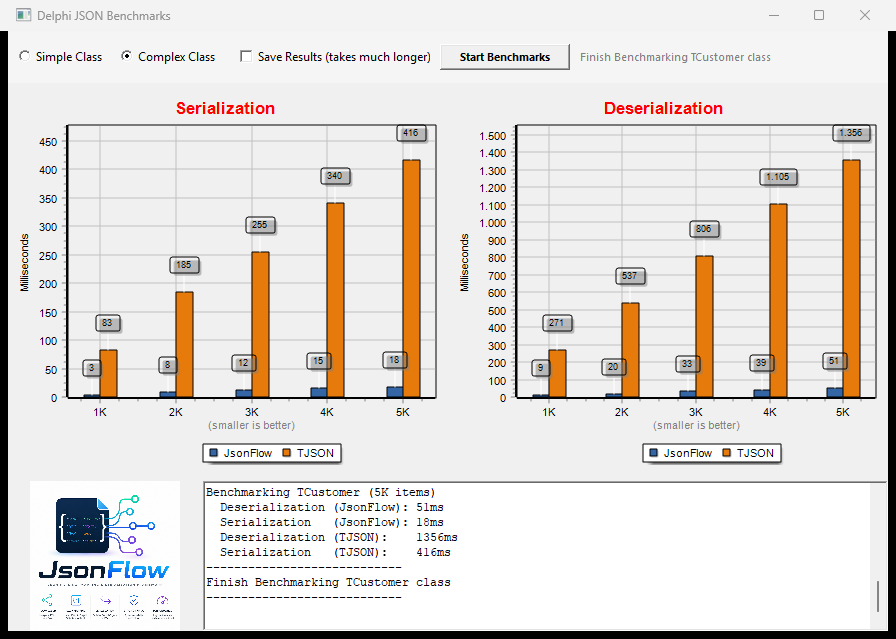
Below is a comparison demonstrating JsonFlow's performance superiority against standard native Delphi JSON:
JsonFlow was also benchmarked against the popular X-SuperObject library — Complex Class scenario (1K to 5K TCustomer objects with nested Address and Contacts). At the 5K scale (Release, Win32): ~7× faster deserialization (47ms vs 319ms) and ~15× faster serialization (19ms vs 298ms):
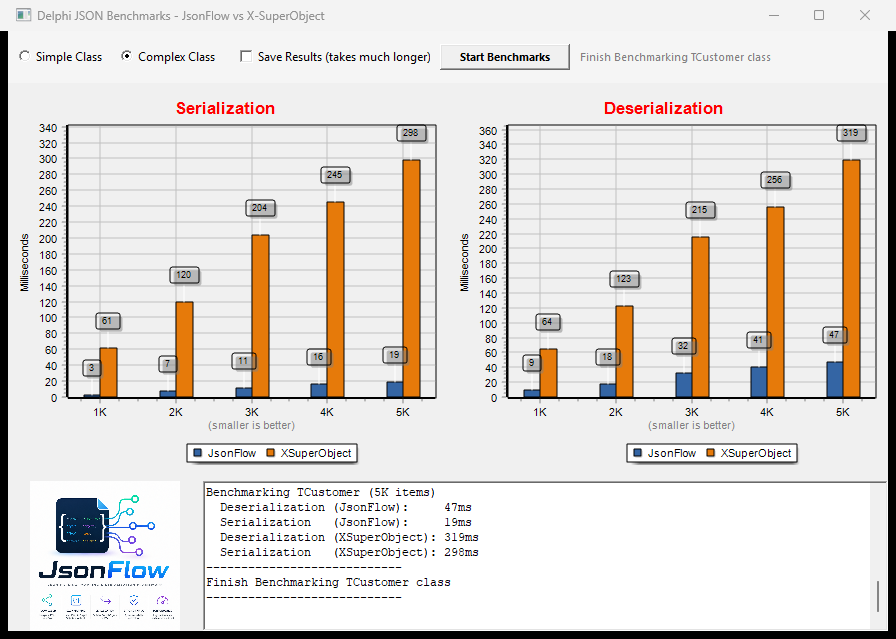
Methodology: identical entities and datasets for both libraries (the same suite used in the native TJSON comparison above); JSON text parsing is excluded from the timings on both sides, so the charts measure pure object marshalling; X-SuperObject received enums as ordinals in its input, since the library does not support string enums. Full benchmark source:
Examples/VCL/JsonFlowBenchmarkXSO.
🐧 Cross-Platform Build — Win32 / Win64 / Linux64
Win32 / Win64: ✅ verified (2026-06-20, real production backend). Linux64: ✅ all 79 framework units compile standalone with
dcclinux64(verified 2026-07-07, RAD Studio 37.0; the Horse middleware integration is out of scope as an external dependency). Linking a final executable still requires a Linux SDK, as described below.
Building a consumer app for Linux64: install the Linux 64-bit platform (RAD Studio GetIt / GetItCmd -if=delphi_linux -ae), provide a Linux SDK (RAD Studio SDK Manager + PAServer, or a sysroot assembled from a WSL/Linux toolchain passed to dcclinux64 via --syslibroot / --libpath), then compile with dcclinux64.
⚙️ Installation
Boss (recommended):
boss install JsonFlow
PubPascal package portal: pubpascal.dev/packages/jsonflow
⚡️ Quick Start
1. Automatic Object Serialization
uses
  JsonFlow.Serializer,
  JsonFlow.Interfaces;

var
  LSerializer: TJSONSerializer;
  LJson: string;
  LUser, LUserCopy: TUser;
begin
  LSerializer := TJSONSerializer.Create;
  try
    LUser := TUser.Create;
    LUser.Name := 'John Doe';
    LUser.Age := 30;

    // Object to JSON String
    LJson := LSerializer.ObjectToJSON(LUser);

    // JSON String back to Object
    LUserCopy := LSerializer.JSONToObject<TUser>(LJson);
  finally
    LSerializer.Free;
  end;
end;
2. In-Place Dynamic Updating (TJSONComposer)
uses
  JsonFlow.Composer;

var
  LComposer: IJSONComposer;
  LUpdatedJson: string;
begin
  LComposer := TJSONComposer.Create;
  LComposer.LoadJSON('{"user":{"name":"John","age":30},"tags":["dev"]}');

  LComposer.SetValue('user.age', 31);
  LComposer.AddToArray('tags', 'lead');

  LUpdatedJson := LComposer.ToJSON(False);
end;
3. Draft 7 JSON Schema Validation
uses
  JsonFlow.SchemaValidator,
  JsonFlow.Interfaces;

var
  LValidator: TSchemaValidator;
  LSchema, LData: IJSONElement;
  LErrors: TList<TValidationError>;
begin
  LValidator := TSchemaValidator.Create;
  try
    LSchema := TJSONElement.ParseFromString(
      '{"type":"object","properties":{"name":{"type":"string","minLength":2}},"required":["name"]}');
    LData := TJSONElement.ParseFromString('{"name":"A"}'); // Fails minLength

    LValidator.Schema := LSchema;
    LErrors := LValidator.Validate(LData);

    if LErrors.Count > 0 then
      WriteLn('Validation failed on path: ' + LErrors[0].Path);
  finally
    LValidator.Free;
  end;
end;
⛏️ Contributing
Contributions are welcome — bug reports, documentation improvements, and pull requests all help.

Steps:
- Fork the repository.
- Create a feature branch:
git checkout -b feat/my-feature - Commit your changes following the project conventions.
- Open a Pull Request against
maindescribing what changed and why. - Wait for review feedback.
📬 Contact

💲 Donation
If JsonFlow saves you time, consider supporting its development.

📄 License
Distributed under the MIT License. See LICENSE for details.
Copyright © 2025-2026 Isaque Pinheiro.