Aefos AI
0.17.0Destaque GoldComercialCRA-readyAgent Execution Flow Orchestration System — AI inside RAD Studio (Delphi): chat + agentic terminal in the IDE, MCP tools, and bring-your-own AI CLI.
Aefos AI
Your favorite AI coding CLI — living inside RAD Studio.
AEFOS — Agent Execution Flow Orchestration System.
In-IDE AI Chat + Terminal for RAD Studio — every Delphi from 10 Seattle to 13 — powered by the AI CLI you already use (Claude Code, Codex, GitHub Copilot CLI, Gemini).





⬇️ Download · 📖 User Manual · 🐛 Report a bug · 🔒 Security · 💙 Support Aefos
English · Português (PT-BR)
This is the public home of Aefos AI — the source code, downloads, the user manual, and the issue tracker. Aefos AI is free software under the GNU GPL v3 (since 5 August 2026).
What it is
Aefos AI brings the AI command-line tools you already use into RAD Studio Delphi 13, with deep awareness of your project. The agent doesn't just talk — it acts on the open project: edits code, builds and runs (with the debugger), drives the Form Designer, and more.
Bring your own CLI. Aefos ships no AI model and manages no credentials — it is a thin, Delphi-aware harness on top of the CLI you already run.
Features
- 💬 In-IDE Chat with an Agent mode that acts on your project (read/edit code, build/run, git, live Form Designer).
- 🖥️ Docked Terminal (real VTerm) with a command palette, profiles, and history.
- 🔀 Multi-provider — Claude Code, Codex, GitHub Copilot CLI, Gemini.
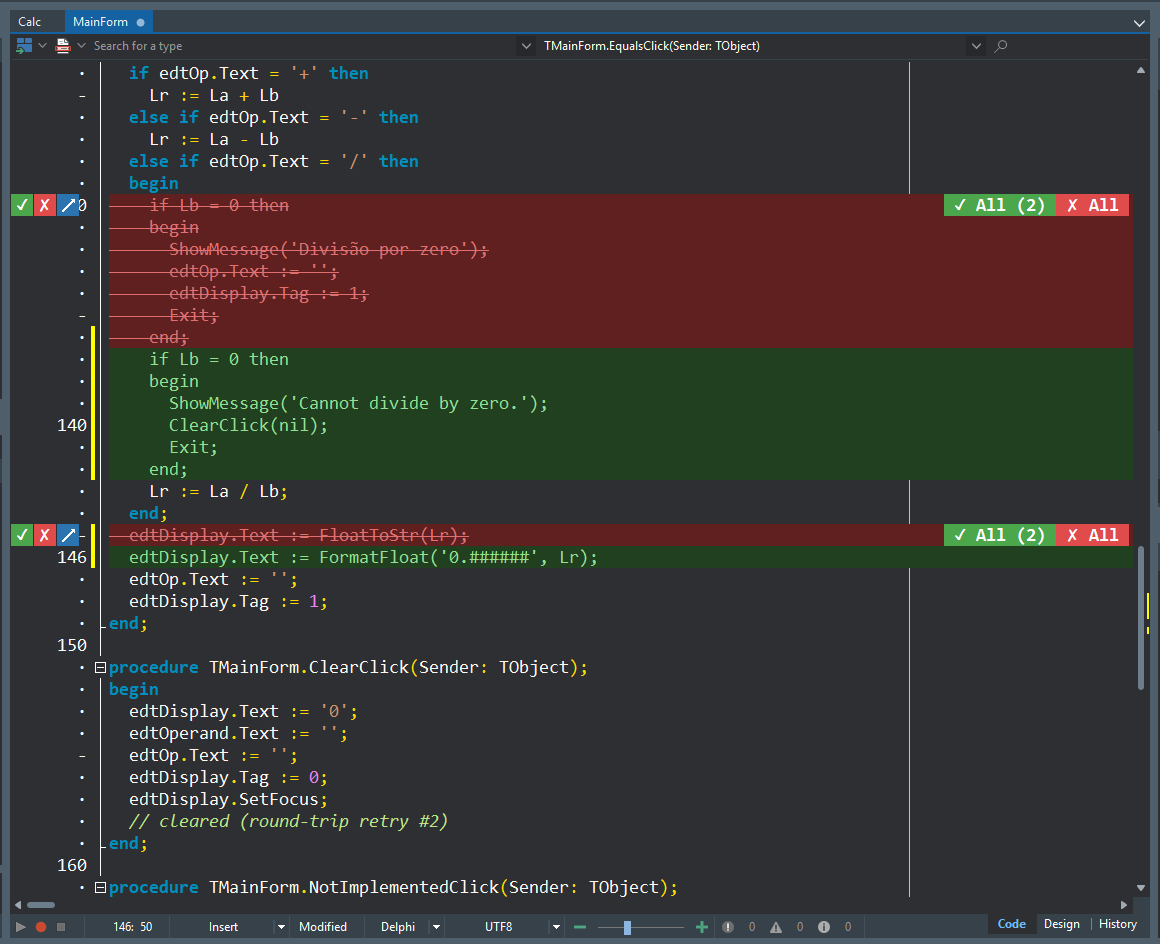
- ✅ Change review — every AI edit shows as a stacked before/after diff (original struck out in red above the new lines in green) with per-change accept / reject / annotate controls in the gutter. Nothing is applied without your approval.
- 🎨 Design ↔ Code flow — add a component and watch the IDE flip to Design; add code and watch it flip to Code.
Screenshots
| 💬 Chat (Agent mode) | 🖥️ Terminal |
|---|---|
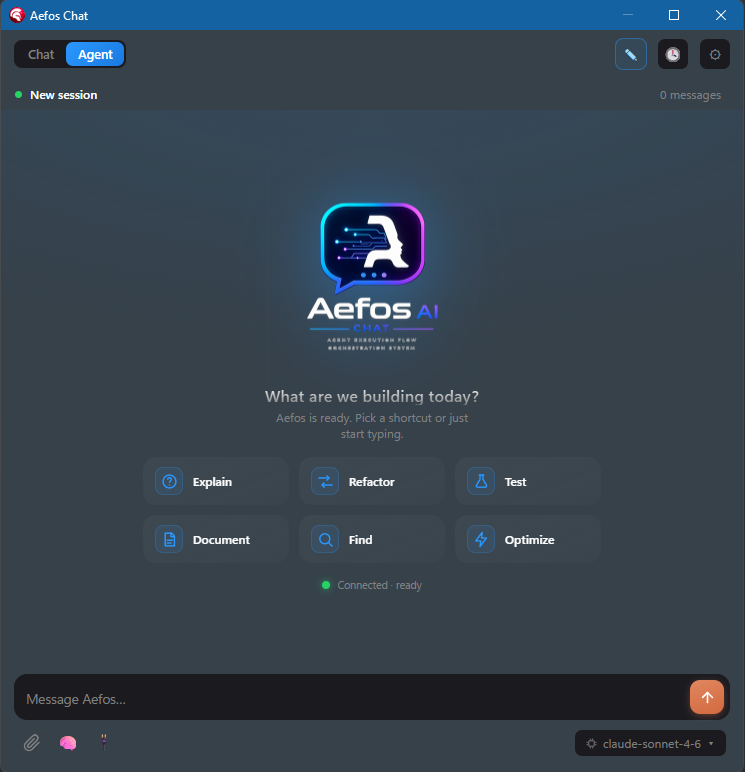 |
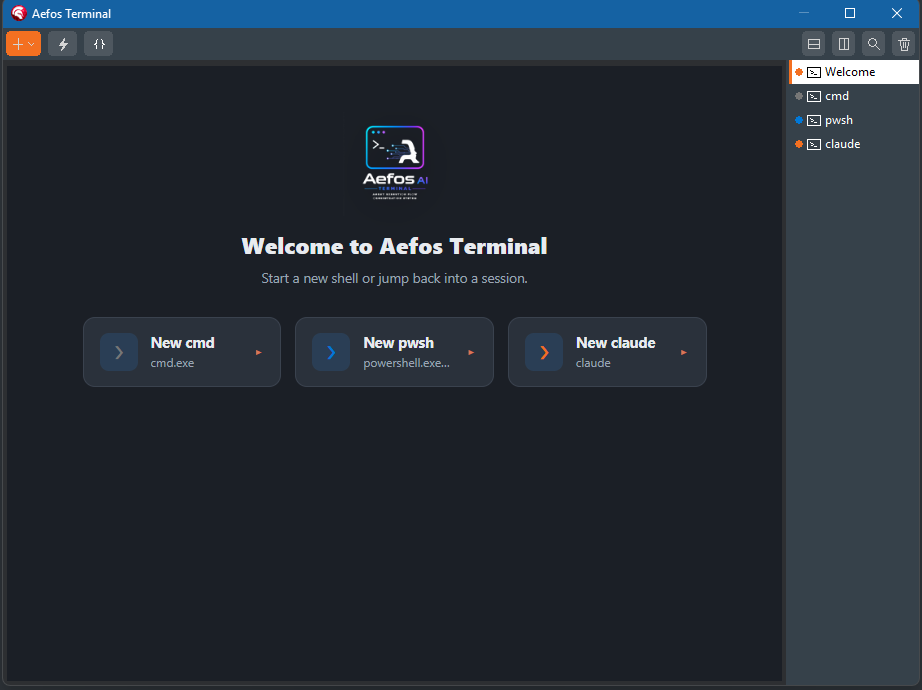 |
Change review — see exactly what each AI edit changes, then accept, reject or annotate it right in the editor gutter:
Build from source
Everything Aefos ships is in this repository, and it builds with no absolute paths — package files use repo-relative sources.
scriptsuild-packages.ps1 -Version all   # 22.0 = D11, 23.0 = D12, 37.0 = D13
installer\build-installer.ps1
Or open packages/Delphi/AefosGroup.groupproj in the IDE and build the group —
the group already carries the dependency order. Only Chat and Terminal
register UI in the IDE; the other packages are runtime dependencies.
Touched source/lazarus/? Run scripts/build-lazarus.ps1 — no other
script compiles that tree.
Aefos/
├─ source/          all product source code
│  ├─ chat/         Chat BPL (Core, UI, Register)
│  ├─ terminal/     Terminal BPL (Core, UI, ThirdParty/libvterm)
│  ├─ providers/    one driver per AI CLI (Claude/Codex/Copilot/Gemini)
│  ├─ harness/      Design/Code seam (WithLiveForm, EnsureCode/DesignView)
│  ├─ webview/      composition-hosted WebView2 (TAefosWebView)
│  ├─ completion/   inline completion (ghost text)
│  ├─ data/         SQLite/FireDAC persistence
│  ├─ lazarus/      the Lazarus/FPC edition
│  ├─ compat/       shims that let units compile under both compilers
│  └─ mcp/          MCP protocol + OTA tool facade + the tool suite
├─ packages/         .dpk/.dproj (Delphi) and .lpk (Lazarus)
├─ mcps/desktop/     the out-of-process desktop MCP server
├─ cli/              the `aefos` command-line tool
├─ installer/        Inno Setup installers
├─ scripts/          build scripts
└─ docs/             technical docs + the user manual
| Read this | For |
|---|---|
docs/architecture.md |
how the pieces fit, and why the MCP engine is decoupled from ToolsAPI |
docs/build-install.md |
build prerequisites, package order, installing the BPLs into an IDE |
docs/intent-view.md |
the Design/Code rule every mutating tool enforces — the thing that makes Aefos a Delphi tool rather than a text editor |
docs/mcp-tools.md |
every MCP tool the IDE exposes to the agent |
CONTRIBUTING.md |
house style, and how to open a PR that lands |
Documentation
📖 User Manual (PT-BR / EN) — install, first steps, Chat, Terminal, providers, configuration, licensing, and troubleshooting.
Requirements
Before installing, make sure you have:
| Item | Requirement |
|---|---|
| IDE | Any RAD Studio from Delphi 10 Seattle (BDS 17.0) to Delphi 13 (BDS 37.0) — Seattle, 10.1 Berlin, 10.2 Tokyo, 10.3 Rio, 10.4 Sydney, 11 Alexandria, 12 Athens, 13. The installer ships all eight and lets you pick which of your installed IDEs to install into. Aefos is an IDE plugin, so the IDE must already be installed. Inline completion (ghost text) needs 12 or newer. |
| OS | Windows |
| AI CLI | At least one AI coding CLI you already use: Claude Code, Codex, GitHub Copilot CLI, or Gemini. Aefos brings no AI model — you bring your own CLI. |
| WebView2 | Microsoft Edge WebView2 Runtime — used for the rich Chat. The installer provisions it automatically; you don't need to install it yourself. |
Install (step by step)
💡 First time? Just follow these five steps — it's a normal Windows installer, per-user, no administrator rights needed.
- Download the latest installer from Releases —
the file is named
Aefos-Setup-<version>.exe(e.g.Aefos-Setup-0.19.1.exe). You can also grab the.sha256next to it to verify the download. - Close RAD Studio completely. The installer copies and registers the IDE packages, so the IDE must be closed (it will tell you if it's still open).
- Run
Aefos-Setup-<version>.exe. It installs per-user into%LOCALAPPDATA%\Aefosand, if the WebView2 Runtime is missing, installs it for you. - Start RAD Studio again.
- Open the panels from the View menu: View → Aefos AI (Chat) and/or View → Aefos AI (Terminal).
Connect your AI CLI (first run)
The Chat talks to the AI CLI you already use. Point Aefos at it once:
- Tools → Options → Aefos → AI Chat (this is editable right away — you don't even need a project open).
- Pick your Executor (Claude Code / Codex / GitHub Copilot CLI / Gemini), set its path and model, and log in to that CLI if it asks.
- Open View → Aefos AI (Chat) and start typing.
License
Aefos AI is free software under the GNU GPL v3 — all of it. There is no key, no activation, no trial and no edition: every feature is in the build you download, including the Terminal, the MCP server and the agent tools.
Two additional permissions are granted under GPLv3 section 7 (see
ADDITIONAL-PERMISSIONS.md): the code Aefos writes
for you is yours, under any licence you choose — using Aefos places no
obligation on what you build — and linking with the RAD Studio libraries a
design-time package cannot exist without is expressly allowed.
The licence that governed the software before 5 August 2026, when it was
proprietary, is kept for the record in EULA-historical.md.
The code is GPL v3; the name and logo are not — a fork is welcome, but it
is not "Aefos AI". See TRADEMARK.md. Contributors sign a short
CLA and keep the copyright to their own work.
Updating, reinstalling & moving to another machine
Close RAD Studio and run the new Aefos-Setup-*.exe over the old one. That is the
whole procedure — for an update, a reinstall, or a move to a different machine.
Nothing is bound to a machine any more, so there is nothing to deactivate or
transfer.
Full walkthrough in the User Manual.
❤️ Support Aefos
Aefos AI is free software (GPL v3) — built and maintained by one developer.
→ Donate / Sponsor Aefos AI ←
Any amount, any payment method — you choose both. Card, Pix or boleto.
In Brazil? Pix goes further — it reaches the project with no processor fee.

Pix key (random): 4b155305-2671-4c39-8d58-7b9b5c428e18
If Aefos saves you or your team time, please consider donating. There is no paywall and no paid tier to upgrade to: every feature is in the build you download. What keeps it maintained, keeps it working across new RAD Studio releases and keeps the roadmap moving are donations and the AI subscriptions its own development runs on, which one person pays for.
Companies: using Aefos internally costs you nothing and obliges you to nothing. If it is part of your toolchain, sponsoring it is the cheapest way to keep it alive, and sponsorship is invoiceable where a personal payment link is not — ask and it will be sorted. Contributions in code are just as welcome as money; see CONTRIBUTING.md.
Reporting bugs & requests
- 🐛 Open an issue — please read the Submission Terms first (short, important).
- 🔒 Security vulnerability? Do not open a public issue — follow SECURITY.md.
- ❓ Questions / help: see SUPPORT.md.
Supply-chain transparency (CRA-ready)
- 📦 SBOM — a machine-readable Software Bill of Materials (CycloneDX 1.5) is
published under
sbom/. - 🔒 Security disclosure policy — SECURITY.md.
- 📝 Actively maintained — see the CHANGELOG.
- 📜 Third-party licenses — THIRD-PARTY-NOTICES.txt.
Privacy & license
- 📜 License — GNU GPL v3, with additional permissions.
- 🔐 Privacy Policy (PT-BR) — LGPD-aligned.
Distributed via PubPascal · © 2026 Aefos AI (TecSis Info)